Most of the blog posts dedicated to speed just point out that we need to measure website speed and offers links to online tools that can do the jobs, but don't explain how and what to measure. For those who are looking for a one-click-solve-all solution will this article be a great disappointment. But those who stay can learn how to get the most accurate measurement and what tools to use.
1. What's the most important point on the website to measure?
In our previous post Website loading speed explained we describe what matters to the real world visitor. Just as a quick reminder here are the most important points to measure:
- First paint
- First meaningful paint
- Visually Complete
- Time to Interactive
All these vectors will influence how your visitor will experience your website so that's why important is to measure them.
2. Geographical location
The golden rule of the physical location of the hosting is its geographical proximity to the most important visitors. Where we're making the measurement is as important as what we're measuring. Why? It's because with longer distance increases the lag and distorts the values. Where do you want to measure the loading speed of your website?
- As close to the server as possible. Why? Because we cannot influence anything beyond the server, I mean the infrastructure that connects users.
- Where your most important or targeted audience is. So for example, if you have 80% of your visitors in US and 20 in Australia, you want to measure both, especially if you're using the CDN
2.1 Do you know where your hosting has its servers and are you sure it's actually there?
In our practice, we found that most inexperienced WordPress users have no clue where their website is located. We had a case of a beauty e-shop in that the hosting company assured the user of hosting the server in Singapore, but after the test, we found out it was actually in the US. How do you find the location of your server? Easy!
- go to KeyCDN ping testing tool
- enter your server IP address (if you don't know what is it, just ask your support)
- look at the column "Min" where is the lowest number, that's location is closest to your hosting

3. Tools to measure website speed
There are few popular tools but after years of testing their reliability, we came to the conclusion that there are only two that get the most accurate readings. Which ones they are?
- Webpagetest.org
- Google Chrome developer console
With these two tools, you can get the data you need to understand how your website is loading. There are other tools, like GTMetrix or Pingdom, but we find them unreliable, confusing or lacking the necessary options to get precise measurements.
Google Speed Insight is great to get a score of User Experience but that's something different than loading speed itself. It's because you get low score with for example Cumulative layout shift, but the website is loaded exactly the same time as if CLS
3.1 Webpagetest.org
After performing thousands of tests and comparing results with real-world data, the WebsPageTest.Org came to us as more reliable with most possibilities of collecting important data. Its most important features are:
- 30+ location all over the world
- Broadband and mobile 3G,4G network simulation
- CPU simulation of mobile devices
- Variety of desktop and mobile browser simulation
- The capture of the video of how the tested website has been rendered
- Waterfall of requests
- Request/respond headers
- Unique URL for comparisons of results
It may appear too geeky but to start to measure the loading time of your website, you need to set just a few basic settings like location, connection type, and you are good to go. But before we dig into measuring itself, let's talk about methodology and the process, and that after Google Develop Console
3.2 Google Chrome Developer console
Google Chrome became the most popular browser some time ago and besides of ability to browse the world wide web, it offers a Developer Conole. If you're not familiar with it, it's a tool that helps developers to create and tune websites so they run as expected. It offers a wide range of features and for the purpose of measuring, we will use only one part called "Network". To get there just press F12 and set up all settings that are indicated with the arrow or triangle:
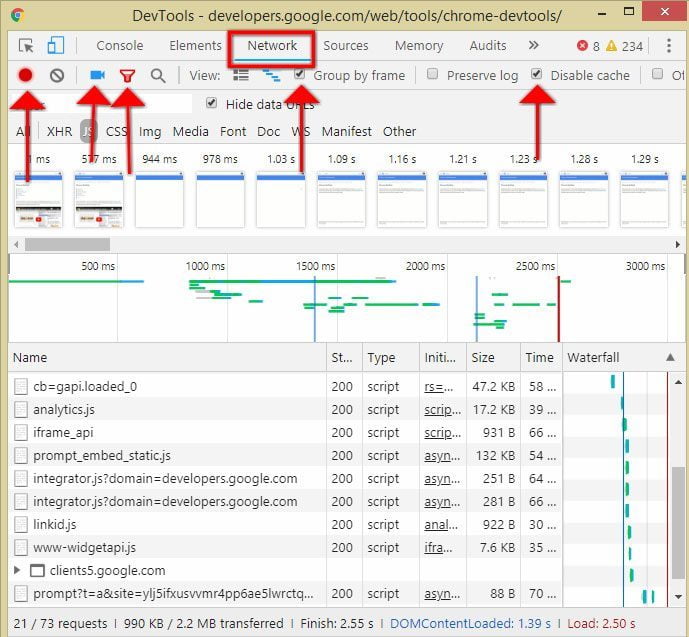
Now we are good o go to measure the loading time on the Google Chrome developer console.
4. The methodology for measuring the speed of the website
4.1 Key performance indicator - KPI
In order to focus on measurement, we've got to have clear our key performance indicators - KPIs. We need to ask the question of what is important and where to measure it. In the beginning, we mention that First paint, First meaningful paint, Visually Complete and Time to interactive are the most important measure we need to get in order to understand our website. The next question is what URL we measure and from what location. Most users measure only the front page, and that's a good starting point but it should be the only one. For example, we have a real estate website where visitors can search for properties. If the front page loads in 1 second, but then it takes 10 to get the search result, you will lose a lot of visitors on the search page. A similar situation applies when you have for example a special landing page, if the first paint is 4 seconds, but the front page loads under 1, that's not very good either. I always recommend taking time and having a look at Google Analytics to see where visitors are landing at your website, as well as where they exiting. If there is a sub-page with a high exit rate, maybe there is something that makes it load slow and visitors leave.
4.2 Geographical testing location
Most inaccurate readings are made due to ignoring the fact that the geographical distance between the website server and the testing server matters a lot. As distance increases, loading time too. Therefore, we have to measure as close as possible to the website server.
To be continued...
The speed matters, what else?
It's 3 minutes reading + 5 minutes videos for better illustration.
Website speed is a concept that describes how people perceive the way how a website is displayed on a device they just using. It's about feeling what evokes in them, not the actual time.
It's all about the perception
When we're talking about loading time, it can't be reduced to a single number. Consider the following two scenarios where the top number is the time in seconds and under is what's displayed on the screen on the given time:
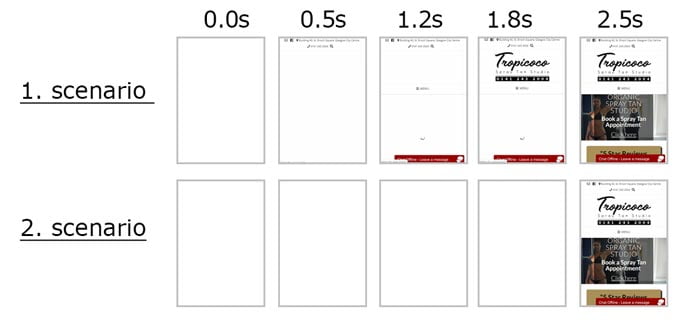
Both websites are loaded at the same time, 2.5 seconds. Which one would feel better to you? Do you prefer to stare at the empty screen for 2.5 seconds? No? Then it's the first one.
Loading time is not just one number.
To get the whole picture of website speed it would be impossible to get with only one single number. The reason is that different subpages may and often do loads differently. For example, the search page might get a longer loading time than "About us" page because to perform a search is much more server's resource-intensive. The most appropriate picture of the loading time is a distribution curve made from all data collected from all visitors of the website. It would look like this:
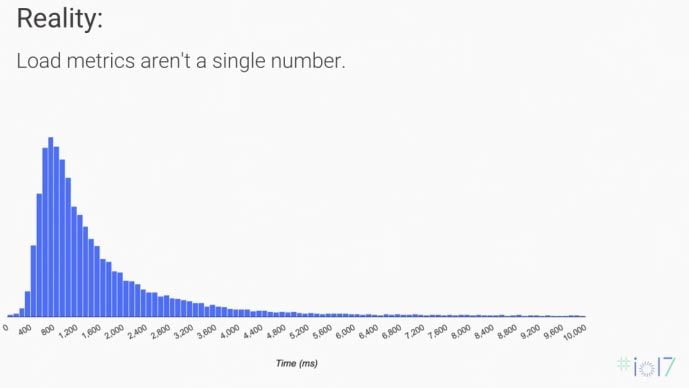
Source: Web Performance: Leveraging the Metrics that Most Affect User Experience (Google I/O '17)
For a few lucky ones this website will be loaded in 0.4s, for the majority, it will be 1.2s and for some, it will take up to 10s to load the website. The well-optimised website has loading time for the majority as close as possible to left.
What matters to every single visitor of your website?
How your website is perceived by your visitors is more important than how fast is loaded. Here are the key questions every visitor asks: https://developers.google.com/web/fundamentals/performance/user-centric-performance-metrics
- Is it happening?
- Is it useful?
- Is it usable?
- Is it delightful?
Let's break it down.
1. Is it happening?
How a user after clicking on the link can know if the website is actually working? A simple answer is: Screen is not blank, something being displayed since landing on the website. If there is a piece of the menu or just a spinning loader, that's much better than just a blank screen. Faster the website displays anything, makes it in the mind of the visitor know that is functional and lowers the probability of bouncing back.
2. Is it useful?
Let's imagine you search for a plumber and by clicking on the Google Search you get to the website promoting a course of becoming a plumber. Is that useful for you at that moment? No! How does it relate to the speed? Well, after your website starts to display step by step all elements, a user wants to know that this is the right page. The sooner you display a piece of content that represents this page, the less chance there would be that visitors will bounce back. It calls the "Hero content" and if the website is well optimised for speed, hero content is displayed as soon as possible.
Here is an example of a website with bad design and vague hero content displayed on the very end of the loading website:
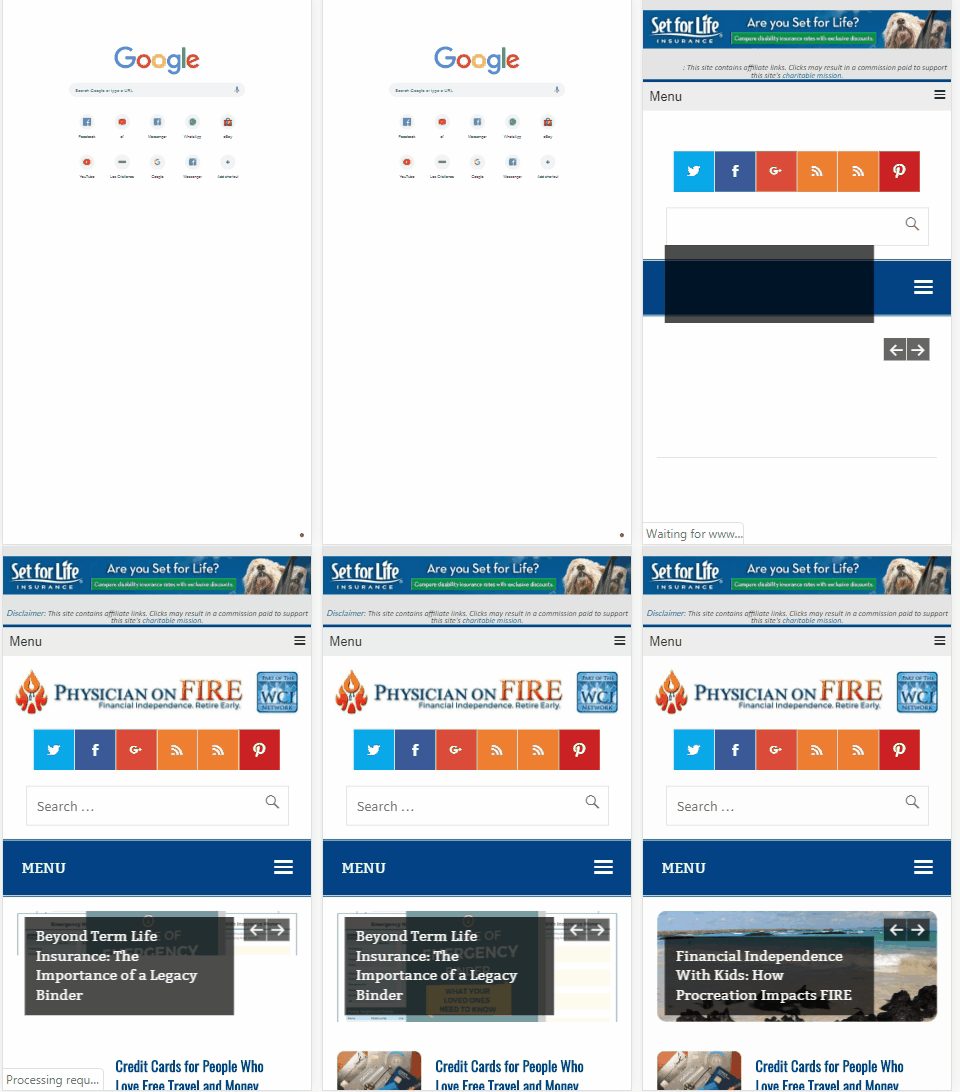
As you can observe, the first bit that is displayed is an advertisement, logo, sharing buttons, search bar and menu. You have to wait till about 6 seconds to realise that is something about life insurance. Isn't it a bit late?
And now compare it to what I consider good hero content displayed fast:
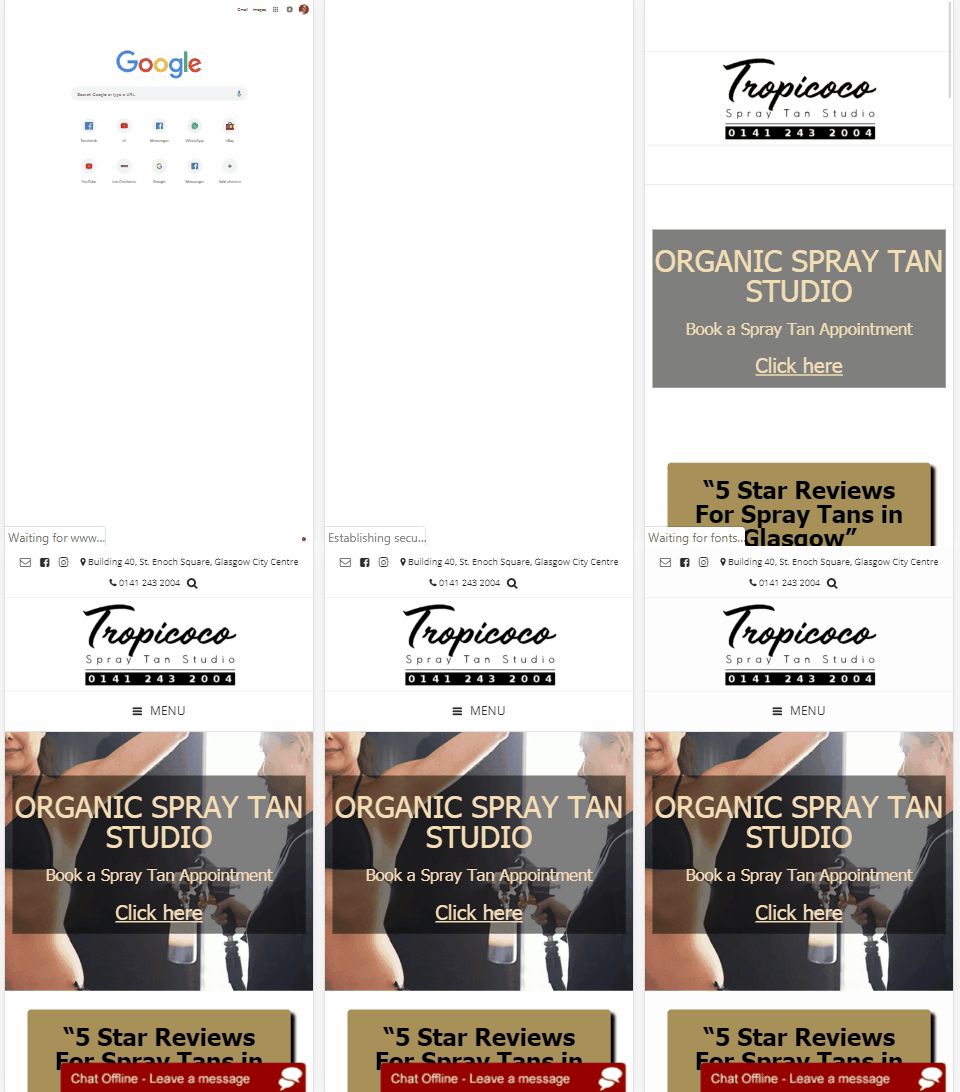
On this website, the visitor knows already at 1.6 seconds that it's a spray tanning studio, and in 2.4 seconds the image of the procedure is displayed. No confusion with that, is it?
3. Is it usable?
This part is not that much related to the speed itself but to the user experience. I bet you've been to the website that has very small buttons and you were struggling to interact with the website. The important part that makes people browse your website, share it and come back is how easy can tap on the button, how easy it is to read the text and find the menu. I mention this bit because no use to have an ultra-fast website that people can't use. To find out more look for an article about Accessibility or look video Power to the People - The Low Hanging Fruit of Accessibility.
4. Is it delightful?
This bit as the previous one is related indirectly but there is one important part that can be influenced by the web developer and that's "Time to interactive". Look at the following situation:

In this video, you can see that on my phone the website was loaded quite fast but I had to wait like 5 seconds to start to interact with it. The cause of such a delay is using too much Javascript. Generally, Javascript is the element that mostly contributes to slowing down the time to load the website and to make it interactive.
Conclusion
As you can see, when we're talking about the speed of the website we have to consider various dimensions. The speed for the real-world user cannot be determined by a single number, a one-time measurement of one page or a score generated by online tools. Now the next question is: How to measure website speed to get the most accurate intel?